The registration of indicators in e-Class mode (lessons), such as performance, continuous assessment, or routines, can be configured based on who has access to this information.
Indicators can be set as:
- Public: Accessible to all entities with permissions to view the student’s profile and assessments.
- Private/Restricted: Visible only to the user who registered it, the pedagogical team, and system administrators.
Indicator configuration can be applied at different levels, depending on the desired scope:
- School-wide settings: Global indicators available in all lessons across the school.
- Course: Indicators specific to a particular course, automatically inherited by classes created from that course template.
- Class: Indicators defined at the class level or specific to a particular subject.
This structure allows schools to adapt records to their pedagogical reality, ensuring consistency, context, and controlled access to information.
1. How to Configure Indicator Visibility
In the “Assessments” menu, edit the assessment grid and enable indicator configuration mode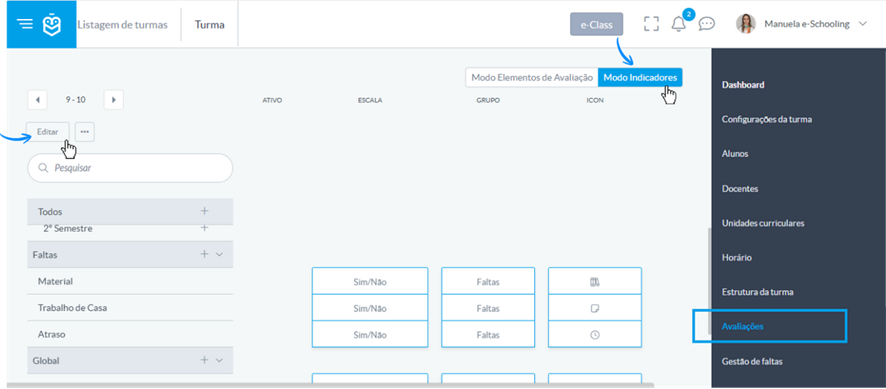
- Create or edit an existing indicator at the desired level (Global, Subject, Semester).
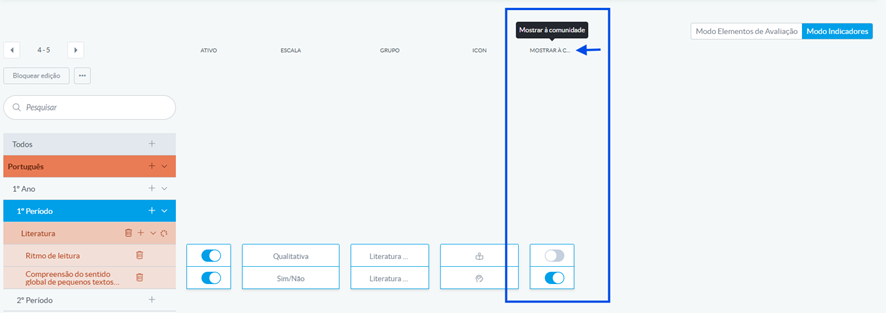
- In the “Visibility to the community” option, set the visibility:
- Enable → Public indicator
 Disable → Private indicator
- Enable → Public indicator
- Click “Save” to apply the change
2. Impact on Community Profiles
When visibility is disabled:
- Feed: No item will be generated when a grade is posted.
- Dashboard: The assessment widget will not display the grade.
- Student Profile: The list will not include these records.
- Lesson Mode: Indicator will not be visible to the community (students, guardians, and consultation profiles).
Access to records by entity type:
- Student, Guardian, and Consultation profiles: See only grades posted while the indicator was set as visible.
- Administrator and Pedagogical Management: Full access to all grades.
- Course Directors: Full access to grades for classes within their course.
- Class Directors: Full access to grades for their assigned classes.
- Teachers: Full access only to grades for their own subjects.
Important Note:
Visibility is defined at the time the grade is posted.
If a grade was posted while the indicator was visible, it remains visible even if the configuration is later changed to private.
Hiding only affects grades posted while the “Visibility to the community” setting is active.
Related Articles: https://help.e-schooling.com/en/support/solutions/articles/202000099884-how-to-configure-student-indicators-in-lessons
Was this article helpful?
That’s Great!
Thank you for your feedback
Sorry! We couldn't be helpful
Thank you for your feedback
Feedback sent
We appreciate your effort and will try to fix the article