e-Schooling allows schools to easily track the number of students enrolled in each class, both during the enrollment process and through the general class listing.
1. Where to Find This Information
The school can access this information at two key moments:
During the Enrollment Process
When starting a student’s enrollment, the system displays a list of available classes, showing the number of students already enrolled in each one.
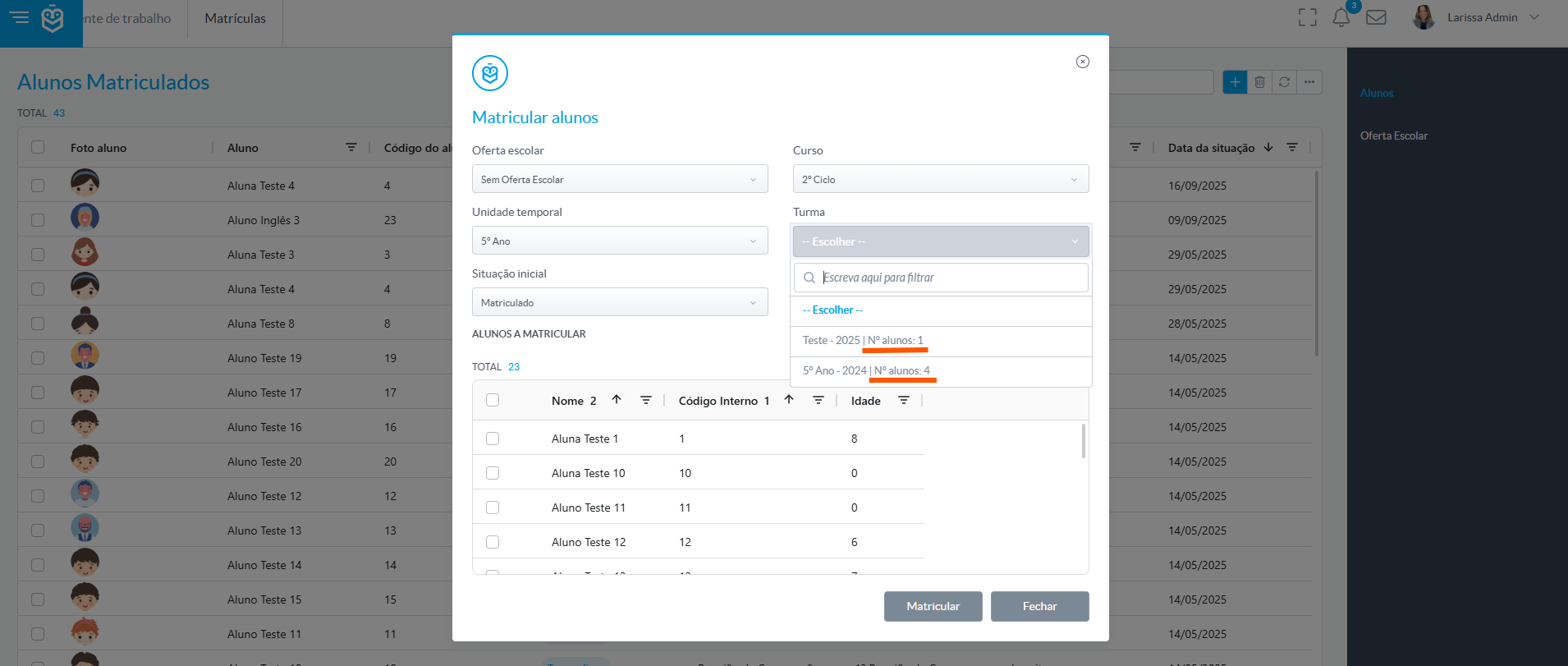
This number includes all students with an enrollment linked to the class, regardless of their start date or current status (initial or final).When Viewing Enrollment in the Student Profile
In the student’s profile, under the Curricular Units submenu, it is also possible to view the number of students enrolled in the corresponding class.

As with the enrollment process, this number includes all students with an enrollment linked to the class, even if they have not yet started attending or have already completed it.Correct interpretation of this data is essential to avoid overcrowding and to support well-informed pedagogical decisions, ensuring that each class remains within defined limits and aligned with the school’s needs.
Was this article helpful?
That’s Great!
Thank you for your feedback
Sorry! We couldn't be helpful
Thank you for your feedback
Feedback sent
We appreciate your effort and will try to fix the article